Tip calculator — split the bill, not the friendship.
Tip, tax and per-person totals in one screen. Works offline.
Splitting a bill with a tip, step by step
A restaurant bill is three numbers pretending to be one: the food, the tax, and the tip. Getting the per-person amount right means keeping them straight and only then dividing.
- Enter the bill. Type the total from the receipt. If the receipt shows a subtotal and a separate tax line, enter the subtotal and add the tax rate — that way the tip is calculated on the food alone, which is the customary way to do it in most of the United States.
- Pick a tip percentage. The quick buttons cover the usual range. 15% is the old standard, 18% is a normal sit-down dinner, 20% is what most people leave when service was good, and 25% is for something above and beyond. You can type any number you like instead of using a button.
- Set the number of people. This is the divisor. It applies to the food, the tax and the tip together, so nobody gets stuck paying a share of a tip they did not agree to.
- Read the per-person figure. The result is what each person owes. The card below it breaks the total into food, tax, tip and the final amount, so you can show the table how the number was reached.
When this comes up
- A group dinner with one card. One person pays, everyone else sends their share. The per-person number is what goes into the payment request, and having the breakdown visible stops the "wait, why is it that much" conversation.
- Checking the terminal’s suggested tips. Card readers in the US often calculate their 20% / 25% / 30% suggestions on the post-tax total, which quietly inflates the tip by the tax rate. Running the same bill here shows what those buttons are actually asking for.
- Splitting something that is not a restaurant bill. A shared taxi, a rented cottage, a group gift. Anything with a total and a head count works the same way, and the tip field can simply be left at zero.
- Working out a service charge. Some restaurants add 18% automatically and still leave a tip line. Entering the service charge as part of the total makes it obvious whether a second tip is being asked for.
A worked example: $84.50 with an 18% tip
Take a bill of $84.50 and add an 18% tip. The tip is 84.50 × 0.18 = $15.21, the total is $99.71, and split between two people that is $49.86 each.
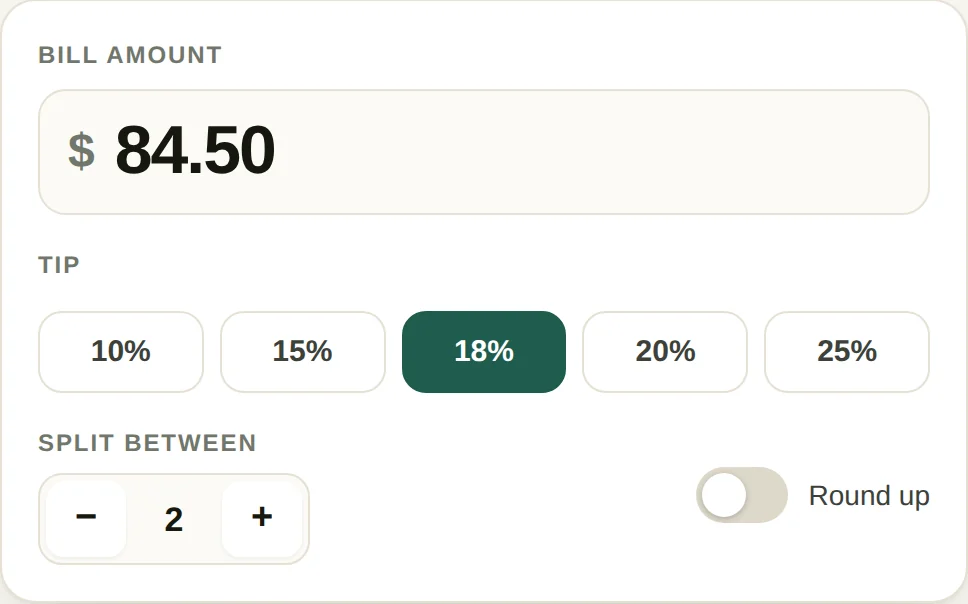
Turn on round-up and the total becomes $100.00: $50.00 each, with the extra $0.29 going to the tip rather than staying with the payer. Rounding the total rather than each share is the part people get wrong. Round six shares of $16.62 up to $17.00 and you collect $102.00 against a $99.71 bill — $2.29 of over-collection that either gets handed back or quietly disappears.
The tax question matters less than the internet suggests. On a $100 bill with 8% tax at 20%, tipping on the subtotal gives $20.00 and tipping on the total gives $21.60. Over a year of restaurants that $1.60 is real money, and pre-tax is the US convention, but nobody is going to be corrected at the table either way. Enter the subtotal for the stricter number, the total for the faster one.
Where splitting goes wrong
- Suggested amounts on card readers are calculated on the post-tax total, and increasingly on a total that already includes a service fee. A 20% button on a taxed, fee-loaded bill can be nearer 24% of the food.
- Even splits break when one person orders the $60 bottle and everyone else drinks water. Split the food here, settle the drinks separately — a two-second conversation that saves an evening of resentment.
- Tip on the pre-discount amount. If a $20 dish is half price, the server still carried the same plate. Tipping 20% of $10 is a quiet pay cut for identical work.
- Cash and card tips are not the same money. A card tip may be processed, taxed and pooled by house rule; cash often goes straight to the person. Both are legitimate, but "I tipped 20%" describes neither very precisely.
Questions
Should the tip be calculated on the pre-tax or post-tax amount?
Custom in the US is pre-tax, because the tax is not the server’s work. In practice most people tip on the total because it is one less step. On a $100 bill with 8% tax the difference between the two at 20% is $1.60, which is why almost nobody argues about it. This tool lets you do either: enter the subtotal to tip pre-tax, or enter the full total to tip on everything.
How much should I tip?
In the US: 18–20% for sit-down table service, 15% for counter service where someone still brings the food, 10–15% with a $3 minimum for delivery, and $1–2 per drink at a bar. In most of Europe a service charge is already included and rounding up is enough. In Japan tipping is not done and can cause confusion.
What is the fastest way to work out 20% in my head?
Move the decimal one place to get 10%, then double it. On $84.50, 10% is $8.45 and 20% is $16.90. For 15%, take the 10% and add half of it again. This is worth knowing because it lets you sanity-check any app, including this one.
Should we split evenly if some people drank and others did not?
Evenly is fine for a group where the difference is a few dollars and the social cost of itemising is higher than the money. It stops being fine when one person orders a $60 bottle and everyone else had water — at that point pay for the drinks separately and split the food here.
More money tools
Guides
No daily limit on this tool
This one is free with no counter — it runs in your browser and costs nothing to serve. All-Access is for the PDF and image tools, which are free three runs a day.
- Unlimited PDF and image jobs
- Full-length output, no page cap
- Every tool added later, included
- One payment, no subscription