Invoice Generator — a numbered invoice with your bank details, not ours.
Line items, a tax rate, Net 30 terms. The PDF is drawn in this tab and saved to your downloads — no upload, no account, no watermark.
Free today: 3/3 invoices, up to 2 line items. All-Access removes both limits and there is no watermark either way.
| Description | Qty | Rate | Amount |
|---|---|---|---|
| — | — | — | — |
- Where the file goesNowhere
- Page sizeLetter, 612 × 792 pt
- WatermarkNone
Changing the payment terms recalculates the due date from the issue date. Type a due date by hand and the terms switch to a custom date, so the two never disagree.
What has to be on an invoice
An invoice is a demand for payment carrying enough detail that the other company's accounts payable team can approve it without emailing you back. Eight things do that work: who is owed, who owes, a unique number, the issue date, the due date, what was supplied with quantities and unit prices, the tax treatment, and where the money should go. A logo, a thank-you line and a payment link are decoration. Miss one of the eight and the document comes back as a query instead of a payment.
Two of them cause most of the trouble. The name on the invoice has to match the legal name on the contract and the name on the bank account, character for character. A trading name that is not in the client's vendor master file gets rejected by their matching software before a person ever looks at it. And the due date has to be a real date, not a phrase: "Net 30" is a term, the payable date is thirty days after the issue date, and if that lands on a Sunday the payment run slips to the Monday.
Numbering: one series, no gaps
Tax authorities in most countries expect a single ascending series per legal entity, with nothing missing. That has a consequence people discover late: when you void invoice 0041 because the job was cancelled, you do not reuse 0041 and you do not delete it. You issue a credit note that references it, and the series continues at 0042. A folder of PDFs holding 0040 and 0042 with no explanation is the sort of thing that turns a routine check into a week of correspondence.
Padding matters more than it sounds. Numbers 0001 through 9999 sort correctly in any file browser or accounting export; numbers 1 through 9999 put invoice 10 between 1 and 2, and a year of them is unreadable. If you bill several clients, a client prefix (NW-0142, HL-0087) keeps two series apart without breaking the sort — just keep one prefix per client and never renumber.
This page remembers the last number you used in this browser and offers the next one, which covers the single-person case. Two people invoicing from the same company still have to agree who takes which number, because the browser cannot see the other laptop.
A worked example: a March retainer
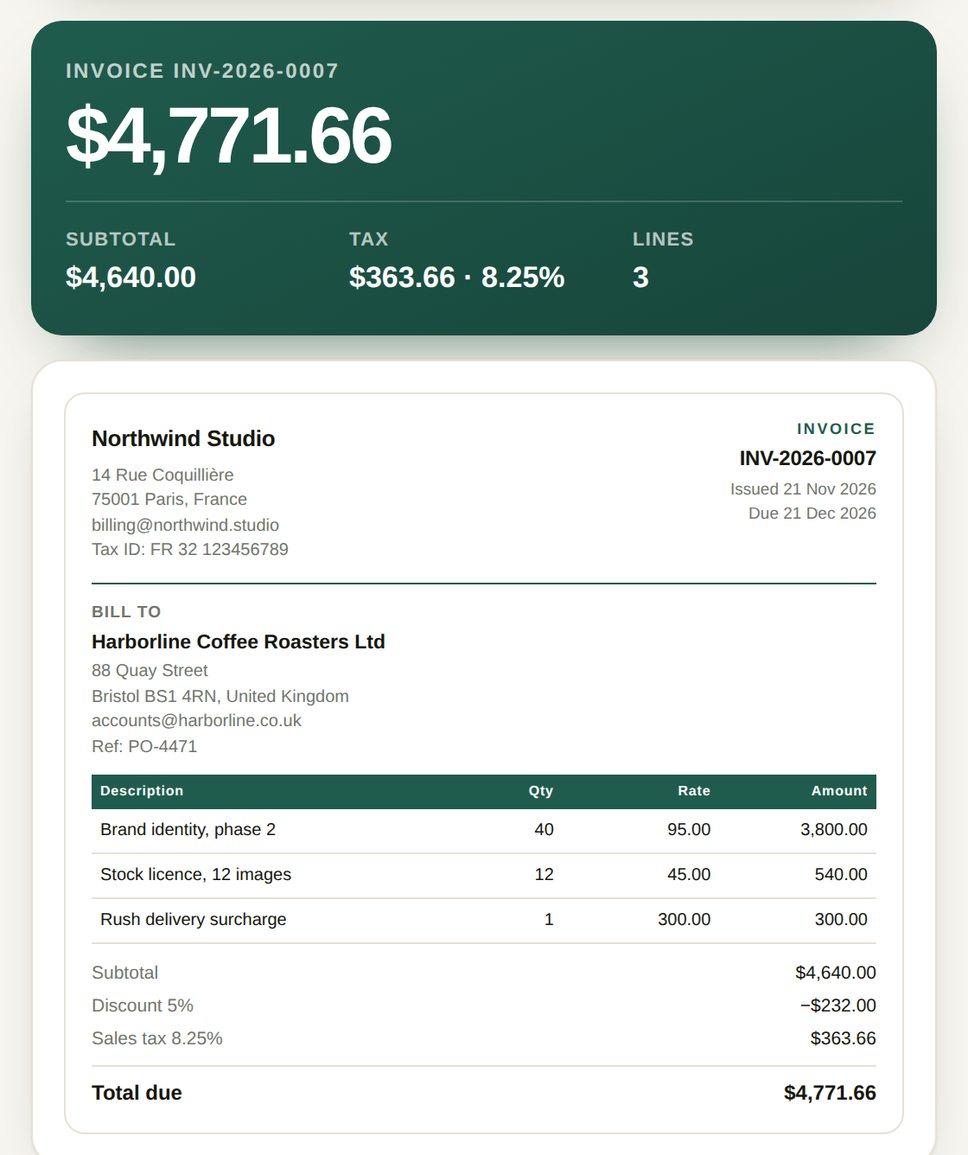
A design studio bills a monthly retainer for March 2026. Invoice INV-2026-0007, issued 1 March, terms Net 30, so the due date is 31 March. Three lines: 40 hours of phase-two identity work at $95, twelve stock images at $45 each, and a $300 rush surcharge.
| Description | Qty | Rate | Amount |
|---|---|---|---|
| Brand identity, phase 2 | 40 | $95.00 | $3,800.00 |
| Stock licence, 12 images | 12 | $45.00 | $540.00 |
| Rush delivery surcharge | 1 | $300.00 | $300.00 |
| Subtotal | $4,640.00 | ||
| Discount 5% | −$232.00 | ||
| Sales tax 8.25% on $4,408.00 | $363.66 | ||
| Total due | $4,771.66 |
The order of those last four lines is not cosmetic. The discount comes off the subtotal and tax applies to what is left: 8.25% of $4,408 is $363.66. Taking the discount after tax would have charged $19.14 of tax on money the client never paid. Nobody notices on one invoice; an auditor sampling twelve months of them notices immediately.
The rush fee is a line, not a hidden markup. Folding it into the hourly rate is the version of this that gets discovered in month four, and after that every earlier invoice gets re-read with suspicion. A line item is also the only version the client can approve without a phone call.
Where invoices get held up
- No purchase order number. Plenty of companies park any invoice above a threshold — $5,000 is common — until it matches a PO. If the client gave you a PO, put it in the reference field. If they did not, ask before you send.
- Currency mismatch. The contract says EUR, the invoice says USD, and the client's system refuses the match. Bill in the contract currency and, if you converted, name the rate and the date you used.
- Wrong entity. Billing a subsidiary that cannot pay, or addressing a parent that never signed. Copy the entity name off the signed page, not off the website footer.
- A due date already gone. Backdating an invoice you send three weeks late starts the Net 30 clock before the client saw it, and their system flags the receipt date as impossible.
- Missing tax numbers across a border. A business-to-business invoice inside the EU needs a valid VAT number on both sides to support the reverse-charge note. Without it the customer cannot reclaim the input tax and will ask you to reissue.
- A total that is off by one cent. Rounding each line and then rounding the sum gives a figure that disagrees with the client's PO line by $0.01, which is enough to hold the whole payment for a week.
Tax, discounts, and the order of operations
Three different charges get called "tax" on an invoice, and the label matters as much as the number. US sales tax depends on nexus and on the ship-to address, and the rate is a stack of state, county and city components. EU VAT on a cross-border business-to-business service is usually zero-rated, with both VAT numbers printed and the words "VAT reverse charged" somewhere visible. UK VAT is 20% on most services, GST and HST in Canada vary by province, and Australia's GST is 10%. This page has one rate field and one label field: type "VAT" and 20, or "Sales tax" and 8.25, and the PDF prints both together.
What it will not do is decide whether you should charge tax at all. That depends on where you are, where the client is, what you sold and whether you crossed a registration threshold — questions for an accountant, not for a form. Withholding is the other trap: a client in a country with withholding tax may deduct 10% or 20% at source and remit it to their own tax office. Your invoice still shows the full amount, the deduction appears on their remittance advice, and if your contract has a gross-up clause you invoice the grossed-up figure instead. Working that out after the client has paid is expensive.
What this page does not do
It produces a PDF, Letter size, drawn in the browser with pdf-lib, and hands it to your downloads folder. There is no rendering step on a server, no file uploaded, no account, and no watermark on the free version: the document carries your name and your bank details and nothing else. Because everything happens in the tab, closing it discards the form. The invoice number is the only thing kept, in local storage, so that the next one can follow it.
It is also not a billing system. No recurring charges, no card collection, no reminders, no ledger, no tax filing. For a payment plan with interest split by period, the amortization schedule generator builds the table; for a one-page transfer of goods, the bill of sale; for a shipment that needs a commercial invoice, a packing list and a matching set of export papers from one form, the trade document generator. Sending several invoices as one file is a job for Merge PDF after you download them.
Questions
Do invoices have to be numbered in sequence?
In most jurisdictions, yes — a single ascending series per legal entity with no gaps. If you void invoice 0041 because the job was cancelled, do not reuse or delete the number. Issue a credit note that references it and continue at 0042. Reused numbers are the first thing an inspector asks about, and a gap with an explanation attached costs ten minutes; a gap without one costs a week.
Does the free version put a watermark on the PDF?
No. The PDF carries your business name, your numbers and your bank details, with nothing added by us. The free plan limits how much you can produce: three invoices a day, each capped at two line items. All-Access removes both limits and covers everything added later.
Can I edit the PDF after downloading it?
Not from this page. The export is a flat PDF, so a correction means regenerating it: keep the number, change the field, download again. Some editors can patch text into an existing file, but the fonts and spacing rarely survive, and an invoice with mismatched type is worse than a reissued one. If the client already has the old file, send the corrected version under the same number with a note, or issue a credit note and a fresh invoice.
Is tax calculated before or after the discount?
After the discount, on the net amount. A 5% discount on a $4,640 subtotal leaves $4,408 taxable, which at 8.25% is $363.66. Taxing the full subtotal and discounting afterwards charges tax on $232 the client never paid — $19.14 here, and exactly the sort of figure a twelve-month sample turns up.
What issue date do I use if I send the invoice late?
The date you actually raise and send it. Backdating starts the payment clock before the client received anything, so a Net 30 invoice can arrive already overdue and accounts payable flags it against their receipt log. If the delay was yours and the client is reasonable, put the real date in the issue field and a short line in the notes.
Can I invoice in a currency I do not hold an account in?
Yes, but the invoice has to state the currency code and the amount has to match the contract. Pick the currency in the form and every line, the tax and the total carry the same symbol. If the client will pay in their own currency at a rate agreed later, say so in the notes and name the reference rate and date, otherwise what they send will not match what you billed.
More money tools
Free: 3 invoices a day, up to 2 line items
Both limits go away with All-Access, along with the counter on every other file tool. One payment, no subscription.
- Unlimited invoices, any number of lines
- Every other tool included, and everything added later
- No counter, no ads, no tracking