Merge PDF — put the PDFs together.
Drop them in, drag the order, get one file. Nothing is uploaded — the pages are stitched in your browser.
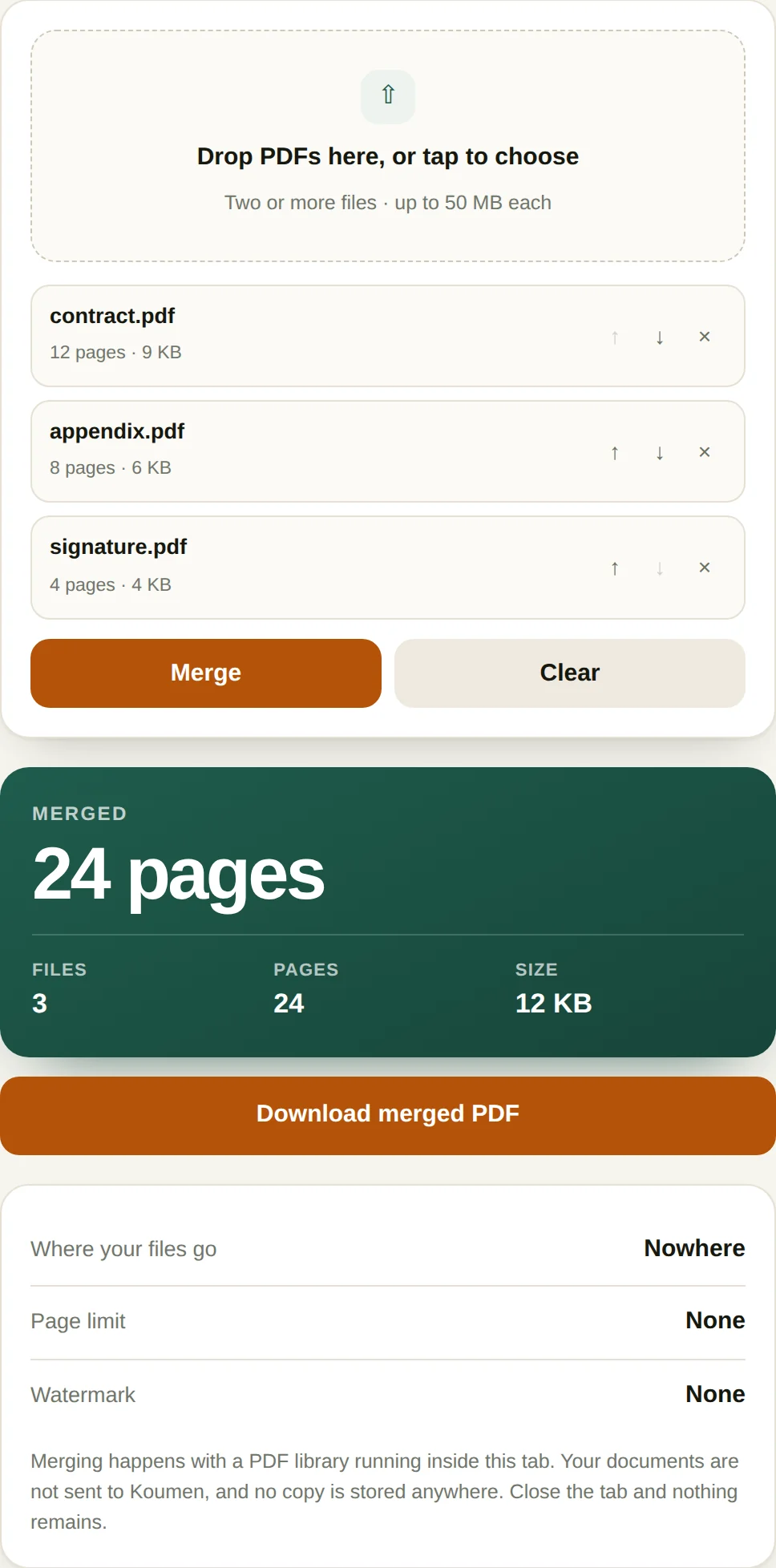
- Where your files goNowhere
- Page limitNone
- WatermarkNone
Merging happens with a PDF library running inside this tab. Your documents are not sent to Koumen, and no copy is stored anywhere. Close the tab and nothing remains.
Merging PDFs without uploading them
Most merge tools ask you to upload your files to a server, combine them there, and download the result. This one does the combining inside your browser tab, which matters when the documents are contracts, invoices or anything with an identity document attached.
- Drop in the files. Drag PDFs onto the box or click to browse. You can select several at once, and you can add more later without losing the ones already in the list. Each row shows the file name, page count and size so you can confirm you picked the right version.
- Put them in order. The arrow buttons move a file up or down the list. Pages come out in exactly the order shown, so the order in the list is the order in the result.
- Remove anything you do not want. The delete button takes a file out of the merge without touching the original on your disk. Nothing is modified until you press the button.
- Press Merge and download. Combining happens immediately. The result reports the total page count and size, and the download button saves the merged file straight to your downloads folder.
When this comes up
- Assembling a signed contract. The main agreement, the schedule, and the signed signature page often arrive as three separate PDFs. Sending them as one file is what the other side expects.
- Building an expense report. Receipts photographed to PDF, a cover sheet, and a bank statement. Merge them into one file that matches the order on the claim form.
- Combining scanned chapters. A long document scanned in batches comes out as several files. Merging restores the reading order.
- Sending a portfolio or a job application. A CV, a cover letter and two work samples become one attachment, which is the format most applicant systems actually want.
A worked example: three documents into one
A 12-page contract, an 8-page appendix and a 4-page signature pack merge into a 24-page file, in the order you list them. Order is the only decision that matters: drag a file up the list and it moves up the document.
Merging is a copy operation, so page size, image resolution and text stay exactly as they were. A Letter-size invoice glued to an A4 report keeps both sizes and the reader will show them differently on screen. What does not survive is everything outside the page: bookmarks, form fields, comments and digital signatures are document-level structures, and three inputs with three sets of them produce an output with none. If a signature matters, merge first and sign the merged file.
The output is often smaller than the sum of the inputs. Three files that each embed the same 2 MB font subset become one file with a single copy, because identical objects are shared rather than duplicated.
Where merging goes wrong
- Encrypted files. A PDF with an owner password that blocks editing cannot be read by the browser at all. Remove the restriction first, or the merge reports it as unreadable.
- Mixed page sizes and orientations. Nothing breaks, but a landscape plan inside a portrait document prints cropped unless the printer is set to fit to page.
- Upload order versus filename order. Drag-and-drop gives you the order you dropped, not 01, 02, 03. Check the list before merging forty scanned pages.
- Very large files. Merging happens in browser memory, so a 400 MB scan set can exhaust a phone's tab. Use a desktop for that one.
Questions
Are my files uploaded to a server?
No. The merge runs in JavaScript inside your browser tab, using your own device’s memory. No part of any file is transmitted, stored, logged or seen by us. You can confirm this yourself: open your browser’s developer tools, switch to the Network tab, and merge something — you will see no request carrying your document.
Is there a file size limit?
The practical limit is your device’s memory, not an artificial cap. In testing, two 18 MB PDFs totalling 240 pages merged in about half a second. Files in the hundreds of megabytes may be slow on a phone, where memory is tighter.
Does merging reduce quality or change the pages?
No. Merging copies the existing page objects into a new document; it does not re-render or re-compress them. Text stays selectable, images keep their original encoding, and the visual result is identical to the source files.
What happens to bookmarks, form fields and links?
Internal links and form fields are preserved as page content. Document-level bookmarks (the outline panel) and document-level metadata like the original author are not carried across, because the merged file is a new document and only one set of those can survive.
More PDF tools
All-Access — every tool, one payment
This tool is free and stays free. All-Access removes the upgrade prompt and unlocks every tool on this site.
- Every current tool, fully unlocked
- Every tool added later, included free
- No ads, no signup, no subscription