Image compressor — smaller files, no upload.
Pick a file, choose how small you want it, download the result. The image never leaves your browser.
- Where the file goesNowhere
- Output formatJPEG or WebP
- Watermark or signupNone
Compression runs on a canvas inside this tab, so the file is never sent to a server. Transparent areas are filled with white, because JPEG has no transparency — that is the only thing the conversion changes.
Shrinking a photo without uploading it
Every mainstream image compressor asks you to upload first. This one does not: the file is read by JavaScript in your tab, redrawn to a canvas at the size you choose, and re-encoded by your own browser.
- Choose an image. JPG, PNG, WebP or a phone photo. The original stays on your disk untouched — the tool reads it, never writes to it.
- Set the longest side. This is usually the biggest lever. A photo straight from a phone is often 4,000 pixels wide; very few places need more than 1,600. Halving the dimensions cuts the pixel count by three quarters.
- Adjust quality. The slider trades file size against visible artefacts. Around 75–85% is the range where the saving is large and the difference is hard to see at normal viewing size.
- Download. The result shows before, after, and the saving as a percentage. If the original was already small and well compressed, the tool says so instead of producing a larger file.
When this comes up
- Getting under an upload limit. Email attachments, job portals and forum uploads all have size caps, and a phone photo will exceed most of them.
- Making a page load faster. Images are the largest part of most page weight. A 4 MB hero image reduced to 200 KB is the single most effective performance change available to most sites.
- Sending photos that contain documents. A passport scan or a signed form is exactly the kind of file you should not be uploading to a random server to be compressed.
- Preparing images for a listing. Marketplaces and property sites impose their own limits and their own compression, and pre-shrinking avoids a double compression that looks worse than one.
A worked example: a 4.2 MB phone photo
A shot at 4032 × 3024 and 4.2 MB, compressed to 1920 px on the longest side at quality 80, lands near 350 KB — a 92% reduction that is invisible on any screen and acceptable in print up to about A5. The 4032-pixel original only earns its keep if you plan to crop hard or print A3.
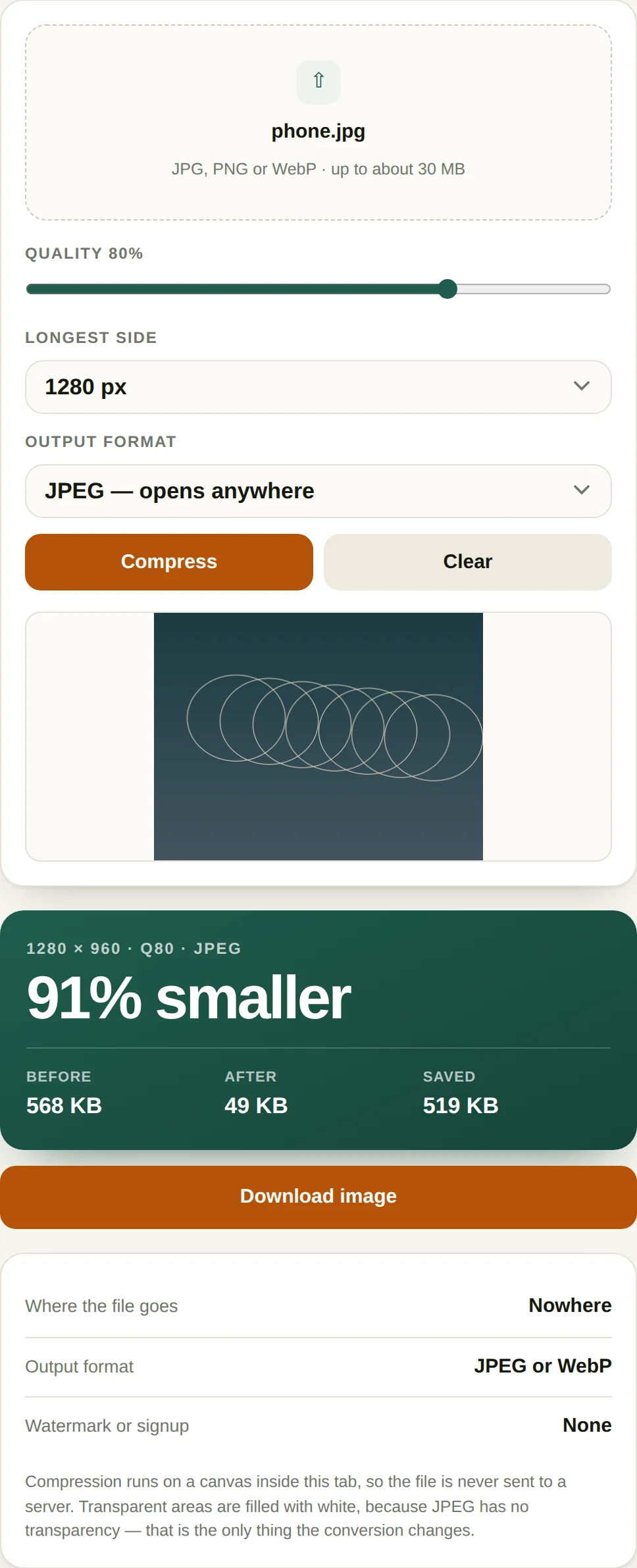
Two settings do most of the work. Longest side is a hard resize: 1920 keeps a 16:9 photo at 1920 × 1080 and a portrait at 1080 × 1920, so the shape survives. Quality is the encoder's dial, and the curve is steep early and flat later — 90 to 80 saves about half the bytes, 80 to 70 saves a third as much again and starts to show on gradients and fine text.
Format is the third lever. WebP at matched visible quality is typically 25–35% smaller than JPEG and supported everywhere that matters now. JPEG remains the safer choice for anything that will be opened in an old desktop application.
Where compression goes wrong
- Compressing twice. JPEG is lossy, so every pass loses again. Always start from the original, never from a previously compressed copy.
- PNG to JPEG. Transparency has no JPEG equivalent and is flattened to black or white. Keep logos as PNG or WebP.
- Upscaling by accident. Setting the longest side above the original resolution adds no detail, only bytes.
- Metadata. EXIF is stripped, which removes GPS coordinates along with camera settings — usually what you want before posting a photo of your kitchen, occasionally what you did not.
Questions
Does this upload my image?
No. The compression runs entirely in your browser using the canvas API. No part of the image is transmitted. You can confirm it: open developer tools, switch to Network, compress something, and watch that no request carries your file.
JPEG or WebP?
WebP is typically 25–35% smaller than JPEG at the same visual quality, and every current browser supports it. JPEG is the safer choice if the file is going somewhere old or unknown — a print shop, an old corporate system, an email client that previews attachments. The tool falls back to JPEG automatically if the browser cannot encode WebP.
Why does the file sometimes get bigger?
Because re-encoding an already-optimised image adds overhead. A 40 KB PNG that has already been through a compressor will not shrink further, and converting it to JPEG at high quality can make it larger. The tool reports "no gain" in that case rather than handing you a worse file.
Does stripping metadata remove the location?
Yes. Canvas re-encoding discards EXIF data entirely, including GPS coordinates, camera model and capture time. That is usually what you want for a photo posted publicly, and it is worth knowing if you needed to keep the metadata for archival reasons.
More PDF tools
All-Access — every tool, one payment
The compressor is free and stays free. All-Access removes the upgrade prompt and unlocks every tool on this site.
- Every current tool, fully unlocked
- Every tool added later, included free
- No ads, no signup, no subscription