Hash generator — MD5, SHA-1, SHA-256, SHA-512.
Check a download against a published checksum, or confirm two files are byte-identical. All four hashes at once, from the same input.
- Where your file goesNowhere
- Algorithms4, computed at once
- Works offlineYes
SHA-1, SHA-256 and SHA-512 use the browser's own crypto implementation. MD5 is not available there, so it is computed here in plain JavaScript — checked against the standard test vectors, including the empty string. A hash proves the bytes did not change; it says nothing about whether they are safe.
Generating a hash from text or a file
A hash function turns any amount of input into a fixed-length string. Change one byte of the input and the entire output changes, which is what makes it useful for checking that data arrived intact.
- Type or paste text. Useful for checking the hash of a known string, or for producing one to paste into a config file or a test fixture.
- Or pick a file. The whole file is read and hashed locally. A downloaded installer is the most common case.
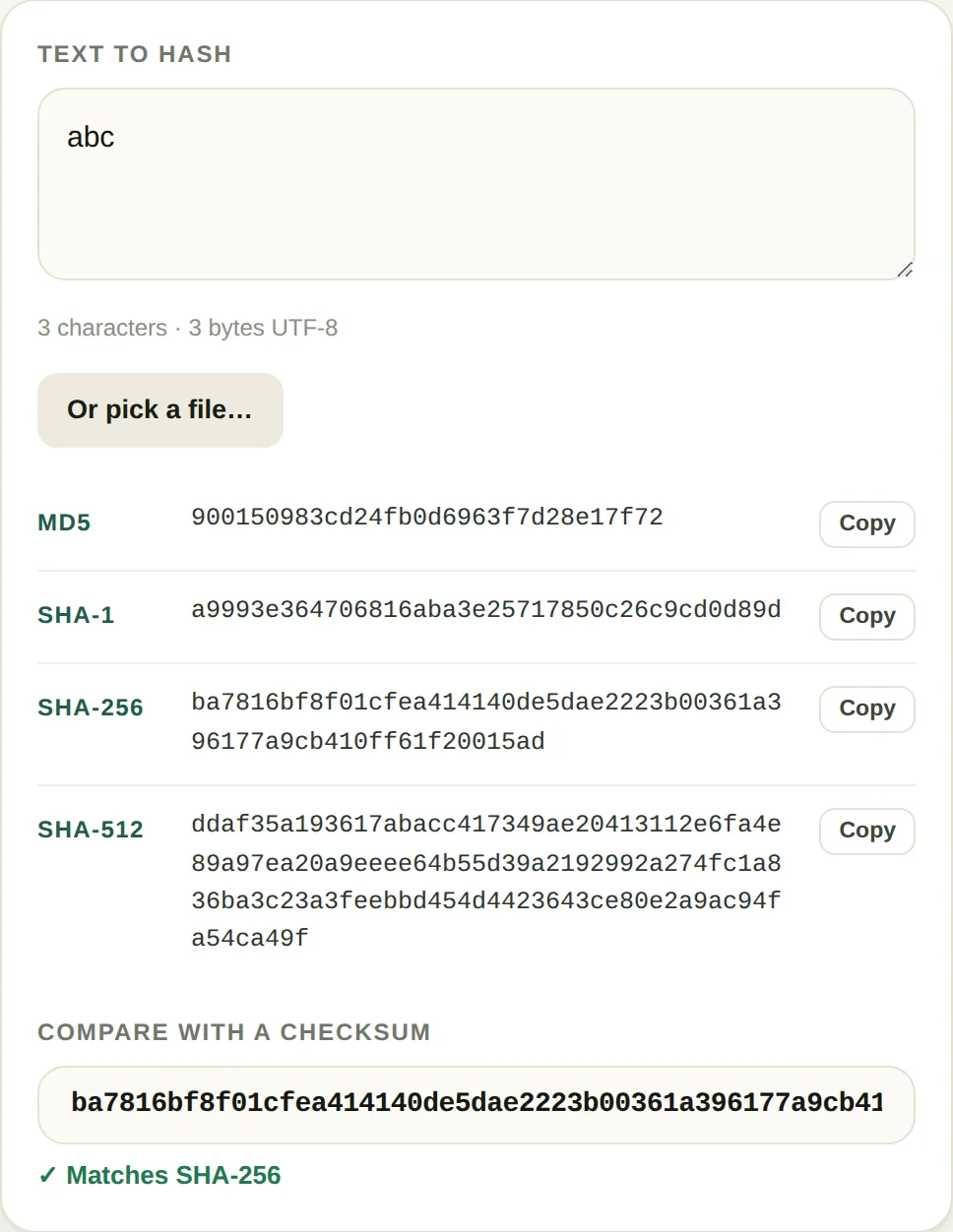
- Read the four values. All four algorithms run on the same input, so you can match whichever one the source published.
- Paste the expected checksum. The comparison is case-insensitive and ignores whitespace, so a hash copied out of a page that wrapped it will still match.
When this comes up
- Verifying a download. Distributors publish a SHA-256 next to the file. If the hash matches, the bytes are the ones they built; if it does not, the download was truncated, corrupted or replaced.
- Confirming two files are identical. Copying large files between drives and machines is where silent corruption happens. A hash comparison is faster to check than opening both files.
- Checking a webhook signature. Most providers send an HMAC of the request body in a header. Reproducing it locally means hashing the exact body bytes — including whitespace.
- Debugging a cache key. When a build system serves the wrong asset, hashing the input tells you whether the content or the key derivation changed.
A worked example: one character changes everything
Two strings that differ by a single letter produce outputs with nothing in common. There is no such thing as a hash that is "close" to another:
| Input | MD5 | SHA-256 (first 16) |
|---|---|---|
abc | 900150983cd24f… | ba7816bf8f01cfea |
abd | 4911e516e5aa21… | a52d159f262b2c6d |
This is called the avalanche effect, and it is the property that makes a hash useful for integrity: any change at all, anywhere in the input, is detected. It also means a checksum comparison cannot tell you what changed — only that something did.
A real file behaves the same way. A 9,446-byte PDF hashes to 7923535425167a18… under SHA-256. Save it again from a program that rewrites metadata, and the file is still a valid PDF, still opens, still looks identical — and the hash is completely different. That is why checksums are published for downloads: the bytes are what matters, not the appearance.
Length tells you which algorithm produced a value, which is the fastest way to spot a mismatch before blaming the data. 32 characters is MD5, 40 is SHA-1, 64 is SHA-256, 128 is SHA-512. If the published checksum is 64 characters and yours is 32, you are comparing two different functions, and no amount of retrying will make them agree.
One practical limit worth knowing: a hash needs the whole input as a single block of bytes, so this page reads the entire file into memory. That is fine for an installer or a video, and it is where a phone starts to struggle past a few hundred megabytes. Command-line tools stream the file in chunks instead, which is why sha256sum handles a 40 GB disk image without breaking a sweat.
Where hashing goes wrong
- Hashing the wrong bytes. A file opened in a text editor and saved again may gain a trailing newline, which changes the hash completely. Checksums are for bytes, not for text that looks the same.
- Comparing MD5 against a SHA-256 file. They are different lengths and never match. Check the prefix: a 32-character checksum is MD5, 40 is SHA-1, 64 is SHA-256, 128 is SHA-512.
- Trusting a hash from the same place as the file. If someone replaced the download, they replaced the checksum on the same page too. A hash only proves integrity against a source you already trust.
- Using MD5 where forgery matters. MD5 and SHA-1 both have practical collision attacks. For an accidental-corruption check that is fine; for anything an attacker would want to forge, use SHA-256.
Questions
Which hash should I use?
SHA-256 unless something forces a different choice. It is what package managers, code signing and checksum files use today. MD5 and SHA-1 still appear in old checksum files and in APIs that have never been updated, but neither is safe against a deliberate collision, so they should not be used where someone has a reason to forge the data.
Is a hash the same as encryption?
No. A hash is one-way: you cannot recover the input from the output, which is why it is used for integrity and for storing passwords. Encryption is two-way and needs a key. Neither is a substitute for the other, and a hash on its own is not a suitable password store either, since it needs salting and a slow algorithm.
Why do the same words give different hashes on another site?
Almost always a difference in character encoding or a trailing newline. The same text encoded as UTF-8 and as UTF-16 produces completely different hashes, and a file saved by an editor that appends a final line break will not match the checksum published for the original.
Is there a file size limit?
Only memory, because the browser reads the whole file to hash it. Files up to a few hundred megabytes are fine on a desktop. On a phone, very large files can run out of memory, in which case hashing on a desktop machine is the practical answer.
More text tools
No daily limit on this tool
This one is free with no counter — it runs in your browser and costs nothing to serve. All-Access is for the PDF and image tools, which are free three runs a day.
- Unlimited PDF and image jobs
- Full-length output, no page cap
- One payment, no subscription